
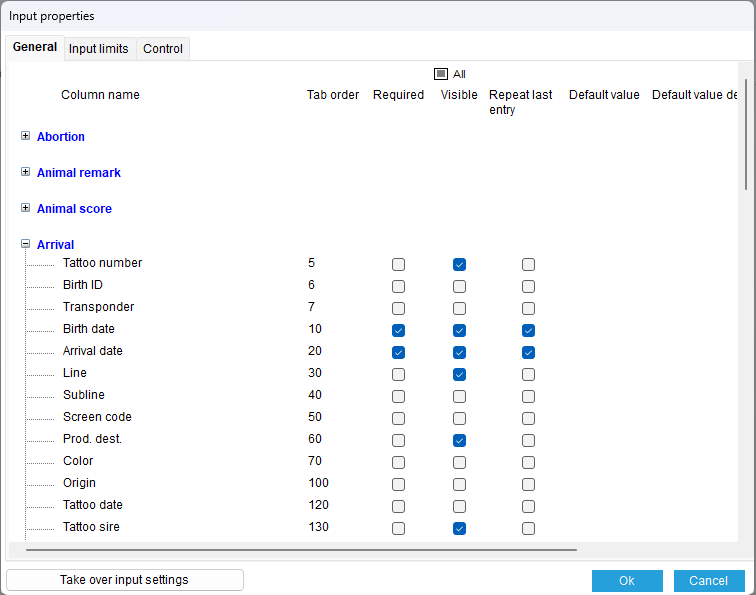
By clicking on the “Properties” button when entering “Individual animal data" or company data,” you can define various properties for almost every column, as shown below.
General
On the first tab of the input settings, you can open an input event of which you want to change the settings.
The available input fields for that input event are displayed. For each input field, you can adjust settings for: tab order, required, visible, repeat last input, default value.
Tab order:
When changing the tab order, after closing the window, the order of the input fields will be adjusted to the new tab order. The lowest number will be at the front.
Tip: Put fields that you fill in often or always at the front, and fields that are used less often or have a standard or repeating value at the back.
Required:
By checking the Required box, this field must always be filled in to save an event.
A required field is usually marked in green during entry.
Tip: A required field does not have to be visible. If a default value is set, this value will be filled in and the event will be saved with the default value.
Visible:
Visible indicates whether the field is displayed during entry. Fields that are mandatory do not need to be visible if a default value is set.
Repeat last entry:
If Repeat last entry is checked, the entry saved for the previous animal or event will be filled in again. This can be useful for dates, so that you don't have to enter the date every time for multiple events on the same day.
Default value:
In some cases, a default value can be entered. This can be used if you always want to use the same value in a field. This default value can be overwritten during entry.
This can be useful for a default beer name or code, etc.
Wildcards can also be used here. See: Guide on using wildcards
The description shows the description of the code you have entered.
Import limits
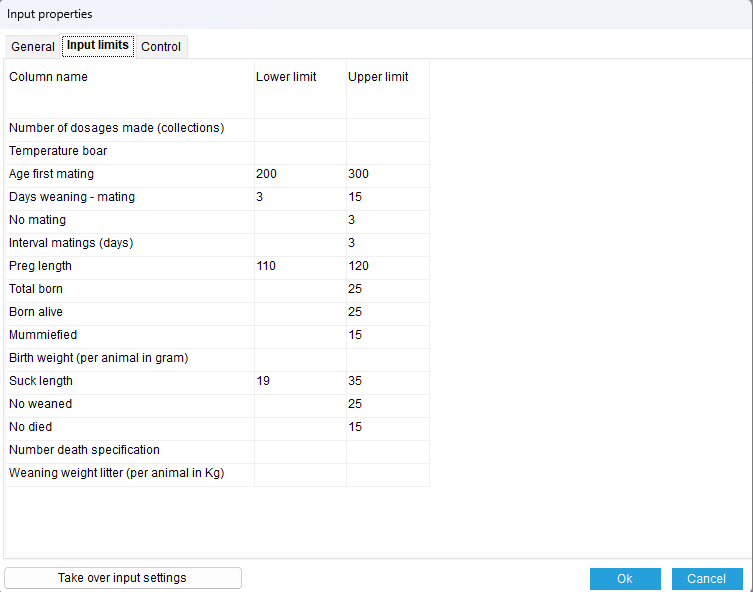
On the input limits tab, you can set upper and lower limits for a number of input fields.
If you exceed the upper or lower limit, you will receive a warning, but if the input is correct, it can still be saved.
Controls
On the controls tab, you can specify whether the boar used for mating must be known in the database.
Take over input settings
The settings of another company can be copied into the database using the Take over input settings button.