
When running any report in PigExpert, the selection screen on the right hand side will determine which animals / periode the report will show.
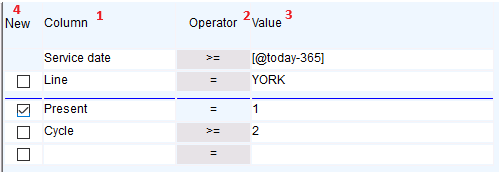
1 (Column): determines which date / trait / KPI the selection will look at
2 (Operator): determines if the value of the selected information should be equal to / greater than / smaller than/ unequal to the entered value
For more information about the operator's, see: What do the operators mean when retrieving an overview?
3 (Value): determines the value for the selection
4 (New): checking the box will close the previous selection and start a new one. This allows you to select multiple groups of animals at the same time, even if previous selections contradict the new selection.
Don't forget to save changes to an overview by clicking Save or Save As in the toolbar.