
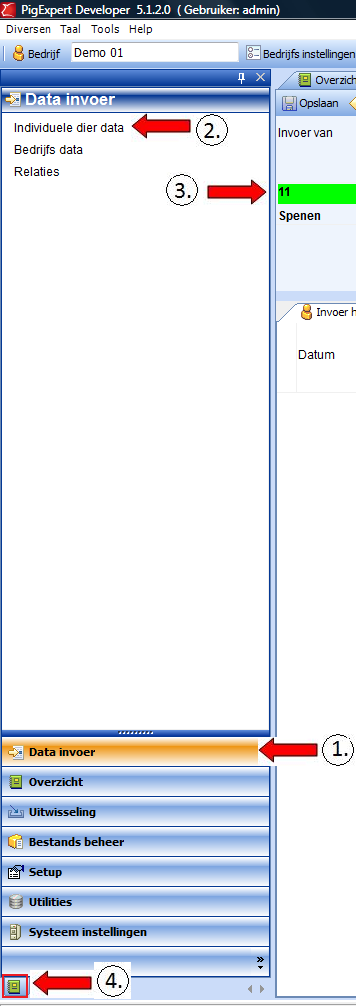
In the left menu, go to “Data entry.”
Select: “Individual animal data.”
Then select the relevant input action. In the example below, this is weaning.
Now click on the green folder at the bottom left of the menu.
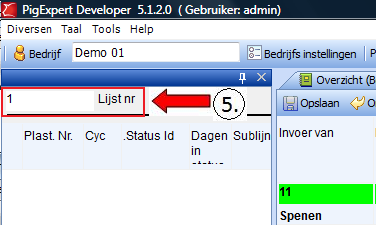
Enter the list number that is also noted on the work list in the upper left corner and press ‘Enter’.
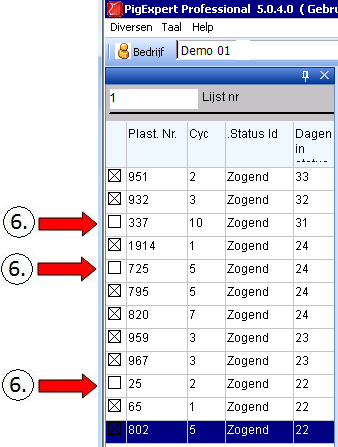
If there are animals that have not been weaned, you can remove the check mark in front of the number. This will prevent the animal from appearing in the work list.
By clicking on the top entry line of the list (no. 951), you can start entering data from the work list. After entering a line, you can press the shortcut key: ‘Save and next’. The entered line is automatically saved, after which the next entry line on the work list appears.
To set up the keyboard shortcuts, see: Keyboard shortcuts