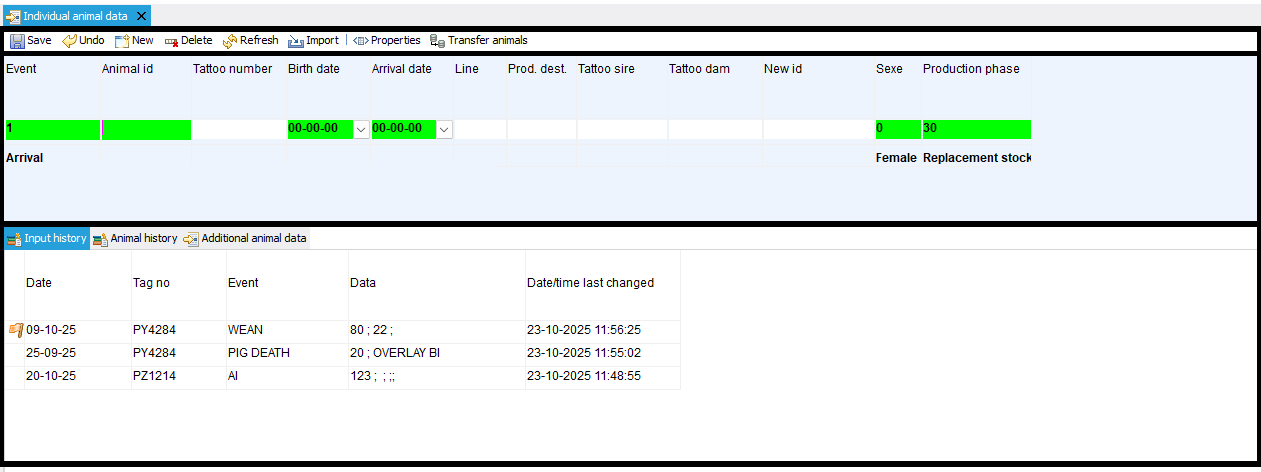
When opening a data entry window in PigExpert, the window is filled with a default layout.
Toolbar
The toolbar provides access to many tasks used to save, delete, etc. data. The buttons can be linked to a keyboard shortcut, see: Keyboard shortcuts
It is NOT possible to add, remove, or move buttons on the toolbar.
For an explanation of the meaning of the buttons, see: Toolbar data entry
Input field
The data is entered in the input field.
Here, new information can be entered by selecting an event and filling in the input fields.
This event can then be saved using the buttons on the toolbar or the keyboard shortcuts.
By clicking on a line in the history, the information entered is also displayed here. This can be edited in the input field and saved or deleted.
History / detailed information
The bottom part of the screen shows the input history. Depending on the type of data input, various tabs with information are available here.
The following links provide more information about the history/detailed information for: