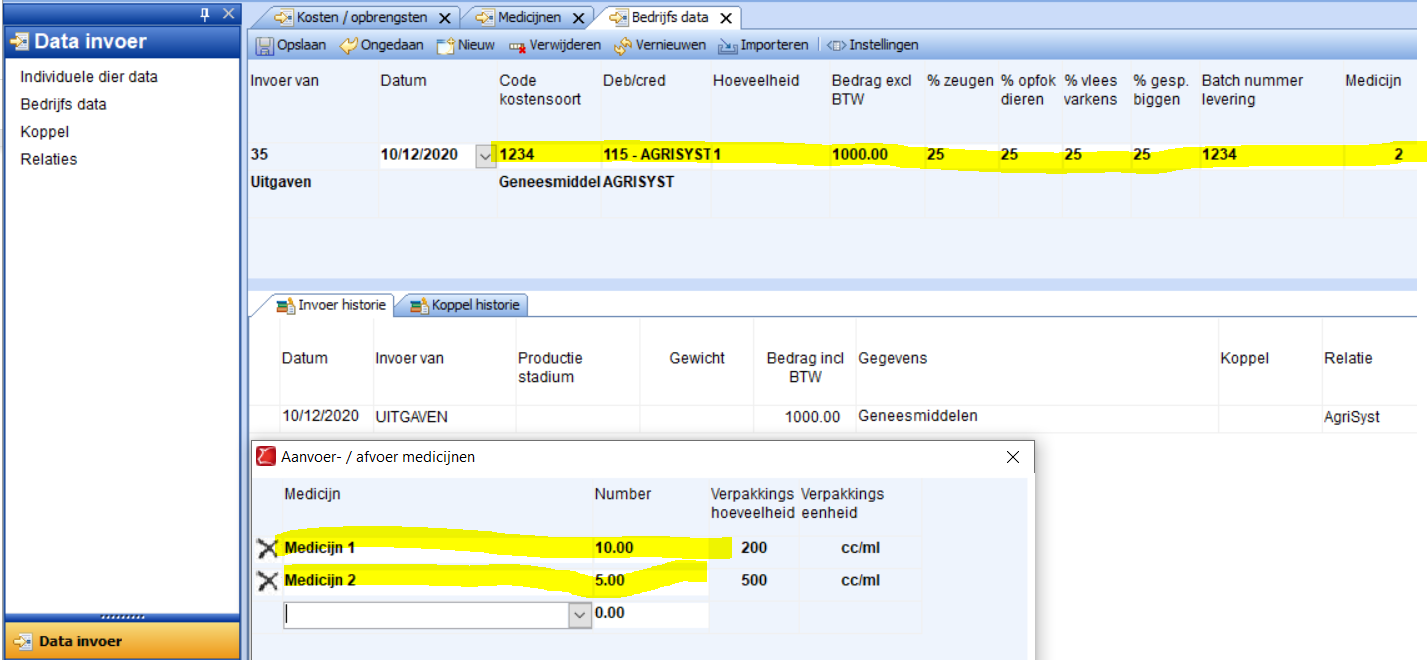
Go to Data entry → Company data and choose the Expense event (default code 35). At Code cost type under the category Health choose the cost type for the medication (See: Creating a cost type for medicines). Default relation and distribution per animal category are filled in automatically, if not fill in or correct the distribution per category if necessary. The quantity always remains 1, this will be determined later by another function. Enter the delivery date and put in the input field Batch number delivery the delivery note number of the veterinarian. Based on this batch number the stock will be calculated later. Go to the input field Medicine and press space. In the window that now opens you can select the medication and specify the quantity supplied. Press OK and then Save to confirm the entry. In the Input history you can look back at the entries.
Use settings to fix and hide certain fields such as quantity and distribution per category. This keeps the input screen clear. For more info, see: Input properties