Program options are settings that apply to all companies and users in the database.
You can open the program options by clicking on the three dots in the top right corner.
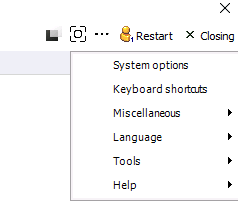
Various settings can be adjusted in the pop-up window that opens.
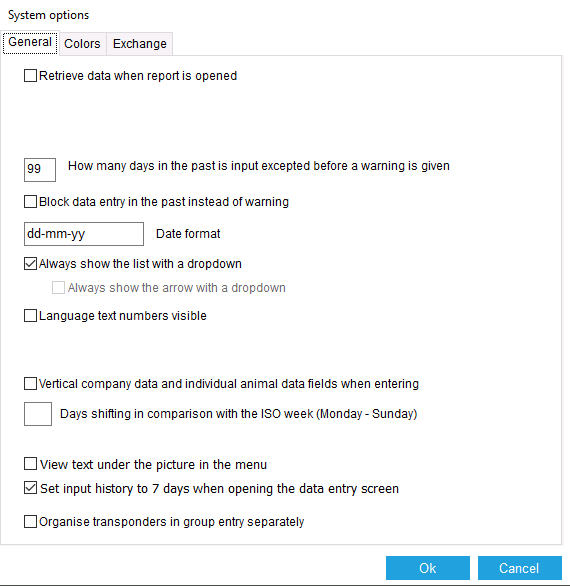
Retrieve data when opening the report
If this option is checked, the data will always be retrieved immediately when the report is opened.
Days past for warning
If you change this option, you will receive a warning sooner or later when you change data from the past.
Block past entries.
It is possible to block past entries. This can also be set per user via “Users.”
Date format
The date format can be adjusted as desired.
Dropdown
If this option is enabled, a dropdown list will be displayed during entry when available.
Language text numbers
This option is for displaying the code from the language table with each translation.
Vertical input fields
It is possible to display the input fields vertically instead of horizontally.
Day shift
With this setting, you can indicate on which day of the week your business week starts.
Text below images
Display the text below the images instead of next to them in the menu bar.
7-day input history
If this option is enabled, the input history for the past 7 days will be displayed instead of the most recently used input history.
Click OK to save the changes.
Change program colors
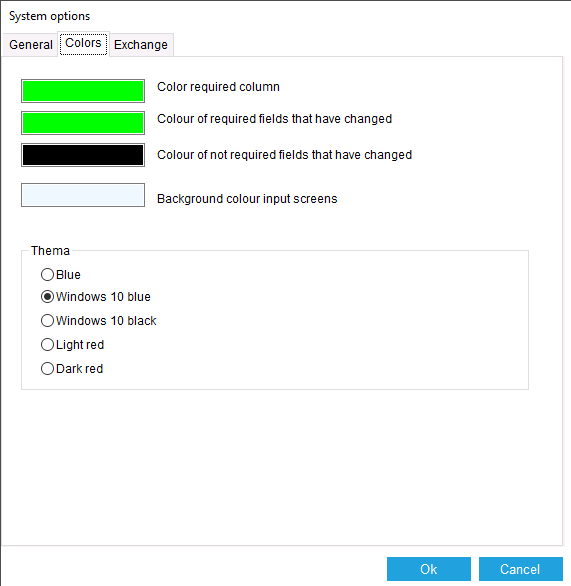
On the Colors tab, you can adjust the colors used by the program.
Here, you can change the green color that indicates mandatory fields to a different color, for example.
Click OK to save.