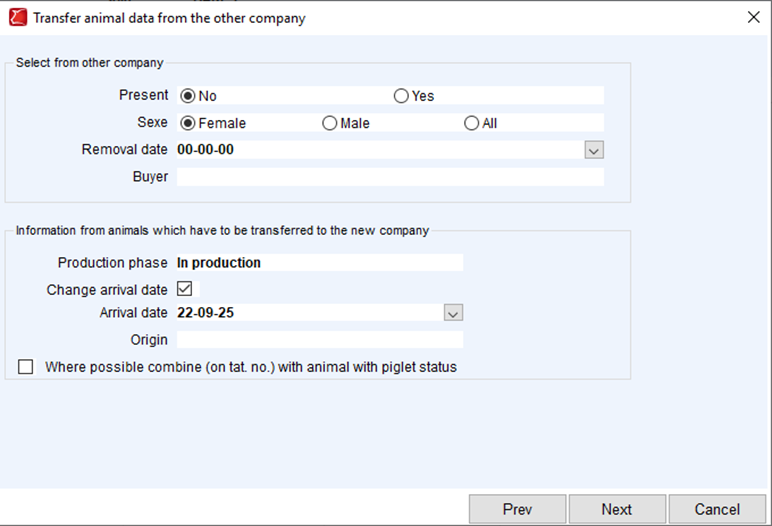
In PigExpert it is easy to move sows from one farm to the other, without entering their complete history again using the transfer animals function.
Removal of individual animals
Animals must be entered as “removed” from the farm they are currently registered on. This can either be done via “2 Removal” or via a custom event that is added for the farm. Make sure that the removal date is entered correctly, because it is needed in the next step.
Please note that if a standard “new id” is set up for the removal, the animals will take that ID with them to the new farm. Make sure to edit or remove the new ID if the original ID is the one that should be transferred to the new farm.
Entering of individual animals
Only do this when all animals for a certain date have been removed from the original farm.
In PigExpert switch to the farm that the animals are going to and open Individual animal data. Next, click on Transfer animals. A popup will appear in which the next steps are done.
- Select the farm where the animals came from and click Next
- The animals have been removed from the original company, which means Present = no. Sexe will usually be female since this function is mostly used for sows, but if it is only males, or both males and females, select that option. The removal date equals the removal date entered in the previous step. Buyer is optional and can be selected from the dropdown menu. In the same screen, make sure to enter the correct data for the new company and click on Next.
- In the next screen, a list of animals will appear that meet the criteria selected in the previous screen. The list will show some information about the animals, like tag numbers and tattoo numbers. If one of the fields is red, it means that it is not possible to enter the data in the farm because the number is already in use. Either enter a different number or cancel the process and rename the current animal with that number to something different.
If one of the animals should not be imported to the new farm, simply uncheck the box for Process and the sow will be excluded from the import. Once everything is set up, click on Finish to start the import. If the import is successful, a green checkmark will appear. If the import failed, a red cross would appear. - After the import is finished, close the popup and the individual animals are now available on the new farm.