In addition to the standard input options in PigExpert under ‘Individual animal data’ and ‘ Company data’, it is possible to create input options/input events according to your own preferences.
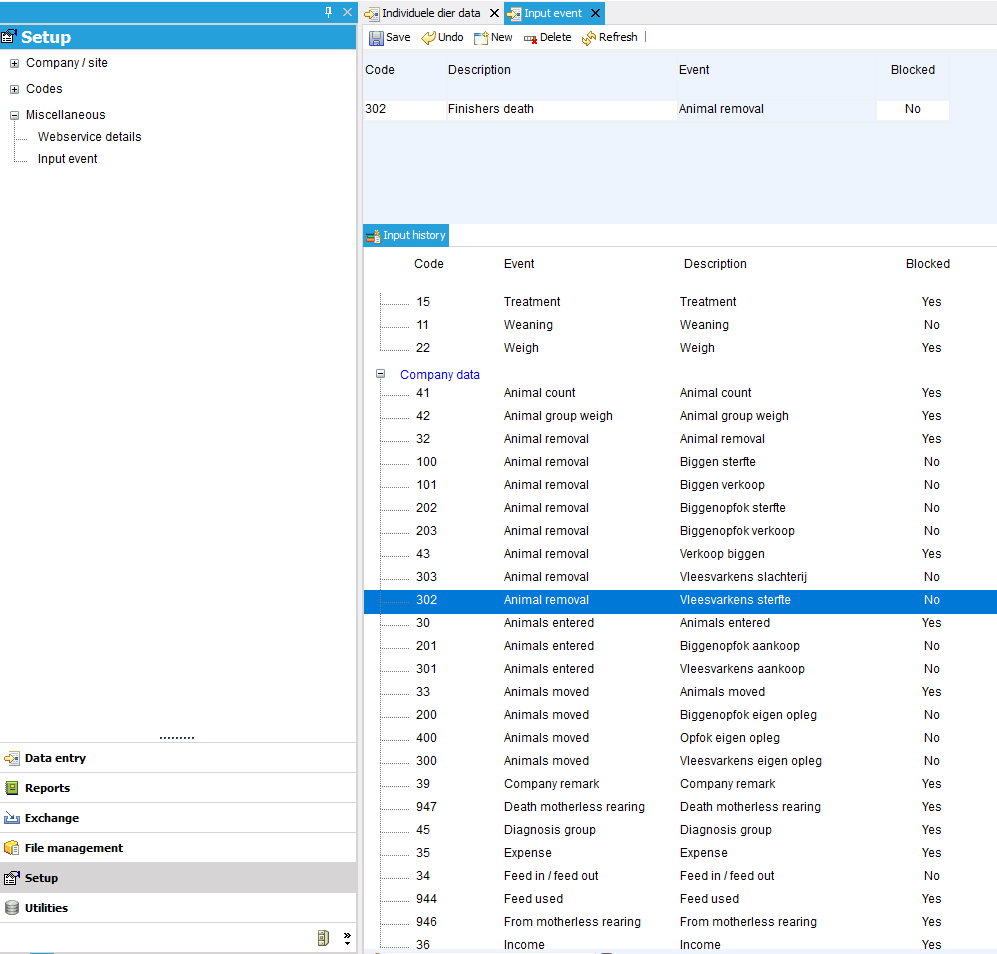
Go to ‘Setup’ --> ‘Miscellaneous’ to access ‘input event’. Here you can create entry events. In the example below, you can create an entry called ‘Finishers death’ under ‘Group data’. With this option, various items (such as disposal type and certain entry fields) can be fixed and set to mortality. You can then use the ‘normal’ ‘Animal removal’ function to sell animals and ‘Fattening pig mortality’ is used for deaths.
The same can be set up for Individual animal data.
More information about customizing input events can be found at: Input properties
Code
The new import event is given a new/unique code.
Description
Here you can enter your own description of what the new input option means.
This description will always be used for the event, regardless of the language setting.
Event
A new input option must be linked to an existing input event. This is due to the available input fields. In the example below, the mortality of finishers is linked to the removal of animals. This means that the same columns are linked to ‘finishers death’ as to ‘Animal removal’. This can then be configured as desired.
Blocked
When an input option is no longer used, it can be blocked. After this, the option will no longer be visible when entering Individual animal data or Company data. If necessary, an event can also be blocked for desktop or mobile only.