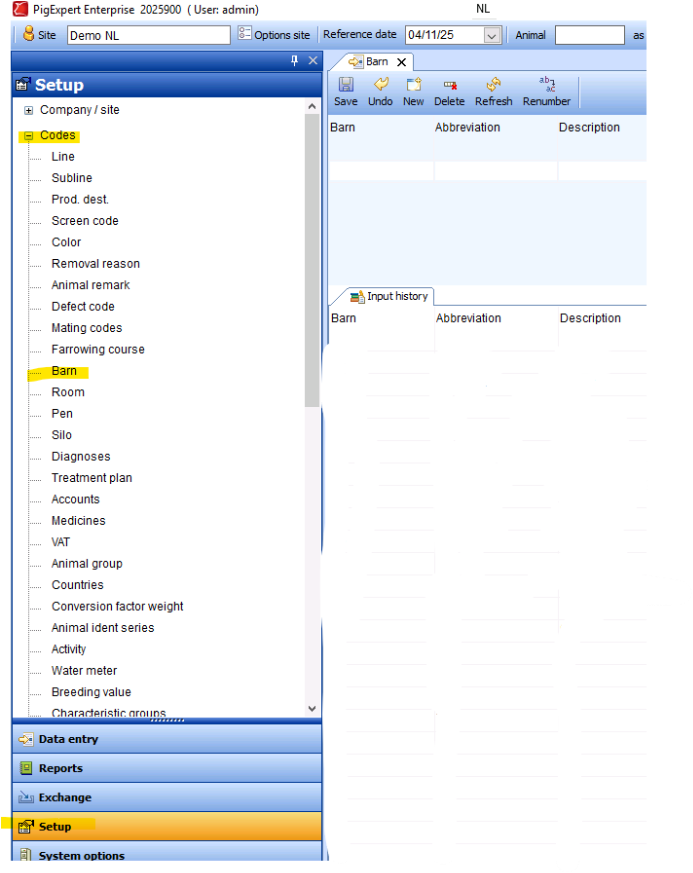
In PigExpert a location is build up by a barn, room and pen. For individual animals it is mandatory to enter the location in this format. Group data can be entered on either barn, room or pen, or on a combination of the three individual components.
It is important to note that a room cannot be created in a barn that is not available in PigExpert. Nor can a pen be entered in a room and/or barn that is not available in PigExpert.
Barn
To enter a barn in PigExpert, go to Setup -> Codes -> Barn.
Enter at least the mandatory information of Barn, Abbreviation and Description. Please note that the barn has a maximum of 4 characters, abbreviation of 10 characters and description of 30 characters.
It is advised to only use numbers in the field barn, to later be able to select data for reports based on a specific barn. In the abbreviation and description, all characters can be used, including special characters as *, - or _.
Additional information about the barns can be entered into the other fields. Save the changes to make sure the barn is available for entry.
Room
To enter a room in PigExpert, go to Setup -> Codes -> Room.
Enter at least the mandatory information of Barn, Room, Abbreviation and Description. Please note that the room has a maximum of 4 characters, abbreviation of 10 characters and description of 30 characters. The code for barn must be saved in PigExpert before it can be entered for a room number.
It is advised to only use numbers in the field room, to later be able to select data for reports based on a specific room. In the abbreviation and description, all characters can be used, including special characters as *, - or _.
Pen
To enter a room in PigExpert, go to Setup -> Codes -> Pen.
Enter at least the mandatory information of Barn, Room, Pen, Abbreviation and Description. Please note that the pen has a maximum of 4 characters, abbreviation of 10 characters and description of 30 characters. The code for barn and room must be saved in PigExpert before it can be entered for a pen number.
It is advised to only use numbers in the field pen, to later be able to select data for reports based on a specific pen. In the abbreviation and description, all characters can be used, including special characters as *, - or _.